APKAnalyst — Documentation
How the tool works, what the API keys are for, and how your keys and data are handled.
1. What APKAnalyst is
APKAnalyst is an AI security analyst agent for Android apps. You give it an
.apk; it decompiles the app, investigates it for security issues the way a human
analyst would — planning, running real static-analysis tools, and reasoning about what it finds —
and returns a prioritized, structured report.
It is deliberately not a pattern-matching scanner. It is an agent: it decides what to look at next, pulls apart native libraries, verifies its own hypotheses with quoted evidence, and cites the security standard each finding maps to rather than relying on the model's memory.
2. How a scan works
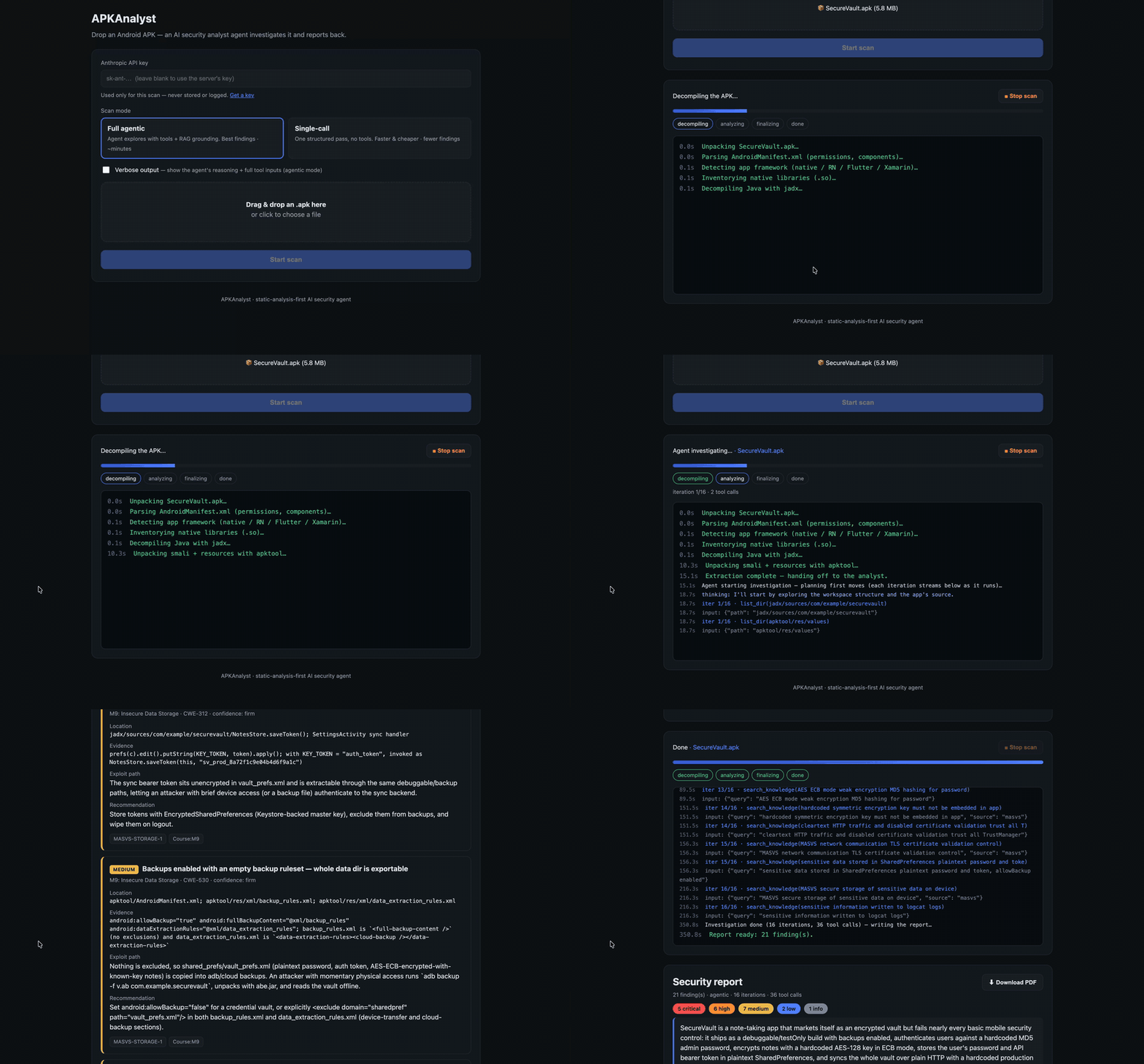
Every scan runs the same first stage — extraction — then hands the facts to the AI:
        your APK
          │  decompile (jadx + apktool) · parse the manifest · extract native strings
          ▼
    extracted facts ──►  Claude (analysis)
                           │   agentic mode also uses tools:
                           │   list_dir · read_file · grep · strings_in_lib · search_knowledge
                           │   findings grounded by ── RAG knowledge base (OWASP MASVS + methodology)
                           ▼
                    structured JSON findings ──►  prioritized report (view in browser · download PDF)
In agentic mode the model runs a tool-driven loop: given a small seed view of the app plus a toolbox, it decides what to read, grep, or disassemble next. When it has investigated thoroughly it stops, and a final structured pass emits the report against a strict schema — severity · OWASP Mobile category · CWE · location · evidence · exploit path · fix · cited standards.
All analysis runs on the server; the browser only uploads the APK, shows live progress, and renders the finished report.
Queueing: this server runs one scan at a time. If a scan is already running when you start, yours waits in a queue and begins automatically when the current one finishes — so at busy times there may be a delay before it starts. The progress view shows your position in the queue (e.g. "#2 in queue"); just leave the page open.
Scheduled maintenance: when an update is planned, a banner appears on the main page showing the date and time (in your local timezone and in UTC). An update restarts the service and will interrupt a scan that is running at that moment, so please avoid starting a scan right before the announced time.
3. Scan modes
| Mode | What it does | Speed / cost | Grounding |
|---|---|---|---|
| Full agentic recommended |
The tool-driven agent investigates the decompiled code across many steps, verifying each finding against the real bytecode. | A few minutes; higher cost — typically ~$1.20–1.50 per scan (many model calls). | Yes — calls search_knowledge (needs a Voyage key + a built index). |
| Single-call | One structured pass over the extracted facts. Fewer, shallower findings — good for a quick look. | ~15–30s; low cost — roughly ~$0.10 (one call). | No retrieval step; uses no Voyage key. |
Agentic mode consistently finds more real issues because it verifies rather than guesses — in our case study it caught the same headline issues as single-call plus three extra code-level bugs, and retracted a false positive single-call had asserted.
Costs are rough estimates that vary with app size, and are billed to whichever API key runs the scan (yours if you provide one).
Without a Voyage key an agentic scan still runs fully — it explores the app with tools and reports — but the knowledge base is not consulted at all (no MASVS/methodology retrieval and no citations); the agent falls back on its own knowledge plus the methodology built into its prompt. Single-call mode never uses the knowledge base either. So the practical difference between single-call and an ungrounded agentic scan is the agentic loop's tool exploration (reading files, grep, disassembling native libs) — not the knowledge base.
4. Why it needs API keys
APKAnalyst doesn't run its own AI model — it calls hosted APIs. Two keys are involved:
Anthropic API key required
This powers the analysis itself: the reasoning, the tool-use loop, and the final structured report are all Claude calls. No Anthropic key (in the form or on the server) means no scan. Get an Anthropic key ↗
Voyage API key optional · agentic only
This powers RAG grounding. In agentic mode the agent's search_knowledge
tool turns its query into an embedding (a numeric vector) using Voyage AI, then finds the most relevant
OWASP MASVS controls and methodology notes by meaning. Those become the citations attached to each
finding.
- Single-call mode never uses Voyage.
- Agentic mode still runs without a Voyage key, but ungrounded — the retrieval step quietly no-ops, so findings carry fewer/weaker standard citations. Because of that, an agentic scan warns you before any paid call when grounding can't run (missing key or missing index), so you can continue ungrounded or cancel.
5. The Voyage key: free vs paid
Voyage's embedding usage is generous, but the throttle depends on whether the account has a payment method:
| Account | Rate limit | What you feel |
|---|---|---|
| Free tier, no card | 3 requests/min · 10K tokens/min | Each search_knowledge call may wait ~a minute, so an agentic scan feels slow
(long silent gaps in the console). |
| Free tier, payment method added | Throttle removed | Retrieval is near-instant. You still get Voyage's large free token allowance — the whole corpus plus a scan's queries is tiny. |
6. How your keys are handled
We want to be precise here rather than reassuring, because your API key is a sensitive secret.
Where a key you paste goes
- It is sent with your scan request to the server over HTTPS.
- On the server it is used only to build that one scan's API client, held in memory (RAM) for the duration of the scan.
- It is never written to disk, never logged, and never stored in the job record the status/report endpoints expose.
- When the scan finishes (or is cancelled) the request ends and the key is discarded.
Bring-your-own-key (required)
This service runs on your keys: an Anthropic key is required for every scan, and a Voyage key is optional (it enables grounded citations). There is no shared server key — if you don't supply an Anthropic key, the scan won't start.
.env once at startup. After adding
or changing a key there, restart the server (Ctrl+C and relaunch) — a running
process won't pick up the change.
7. Protecting yourself (recommended)
Whenever you hand an API key to any hosted tool — this one included — reduce what a leak could cost you:
- Create a dedicated key just for this, separate from any production key.
- Cap its spend / rate limit where the provider allows (Anthropic and Voyage both let you set per-key limits), so an unexpected loop or leak can't run up a large bill.
- Revoke it when you're done. A one-off scan doesn't need a long-lived key — delete it afterward from the Anthropic / Voyage dashboard.
- Never reuse a key that has broad access to other projects or billing.
8. Your APK & your data
- Uploads are capped (200 MB by default) and must be
.apkfiles. - Each scan gets its own temporary workspace on the server for the decompiled output; the server deletes it after the scan.
- Job state (progress + the finished report) is kept in memory only — it isn't written to a database and doesn't survive a server restart.
- The live console shows only static stage text, the uploaded file's name, and the target app's own decompiled paths/queries — never your keys or server internals.
- Your APK is sent to Anthropic (and, for grounding, your query text to Voyage) as part of the analysis. Don't upload an app you're not entitled to analyze, or one containing secrets you can't share with those providers.
9. Grounding & citations
Findings are grounded in a local vector knowledge base with two roles:
- Rulebook — OWASP MASVS. The Mobile App Security Verification Standard controls, so a finding cites which standard it violates.
- Playbook — analyst methodology. A curated static-analysis methodology base that guides how to find and confirm an issue.
The corpus is embedded once with Voyage AI into a small local vector store; at analysis time the agent retrieves the most relevant controls/notes by meaning and records them on each finding. As a guard against the model inventing a citation, any cited standard that isn't actually in the corpus is dropped before the report is shown — so every citation you see is a real, resolvable reference.
10. Running it yourself
APKAnalyst is open to run locally. It needs jadx, apktool, and
strings on the server's PATH, plus Python dependencies.
pip install -r requirements.txt
cp .env.example .env          # add ANTHROPIC_API_KEY (and VOYAGE_API_KEY for grounding)
python3 run.py --build-kb     # build the RAG index once
python3 -m uvicorn webapp.server:app --port 8077
Then open http://127.0.0.1:8077. With no methodology notes the index builds
MASVS-only and the tool still works — findings just cite MASVS. Full setup details,
including how to add your own methodology notes, are in the project README and
playbook/README.md.
11. Legal & disclaimer
- Only scan apps you're authorized to analyze. By uploading an APK you confirm you have the right to do so. Don't upload apps you don't own or lack permission to inspect.
- Findings are AI-generated and not guaranteed. They may include false positives or miss real issues, and are for informational purposes only — not a certification, audit, or professional security assessment. Verify anything important independently.
- No warranty; no liability. This tool is provided "as is", without warranty of any kind. The operator is not liable for any loss or damage arising from its use.
- Third-party processing. Running a scan sends the app's extracted data to Anthropic (and, for grounding, query text to Voyage). Their terms and privacy policies apply.
- API costs are yours. If you supply your own key, all usage is billed to that account.
The project's source code is released under the PolyForm Noncommercial License 1.0.0 — that governs reuse of the code; use of this hosted service is governed by the terms on this page.
Attribution. The knowledge base is built from OWASP MASVS, MASWE and MASTG, © the OWASP Foundation, used under CC BY-SA 4.0. Decompilation uses jadx and Apktool (Apache-2.0). These projects do not endorse this service.
12. Privacy & data
- Your APK is processed transiently. It's unpacked into a per-scan working directory that is deleted right after the scan. The app isn't archived or stored long-term.
- Where your data goes. To analyze the app, its extracted contents are sent to Anthropic (the analysis model) and, for grounding, query text to Voyage AI (embeddings). Their processing is governed by their own terms and privacy policies. Anthropic does not train its models on data submitted through its API by default.
- API keys. A key you paste is used only for that scan and never stored, logged, or written to disk (see §6).
- Reports. A finished report is held in server memory only and is not written to a database; it does not survive a server restart.
- Operational logs. Basic request/usage counts may be kept to run and protect the service; these are not sold or shared, and are not used to identify you.
- Don't upload sensitive or unauthorized apps. Only submit apps you're allowed to analyze and that you're comfortable sending to the third-party providers above.
Questions or a removal request can be directed to the site operator at access_request@apkanalyst.com.
Built on jadx, Apktool, Voyage AI, and Anthropic Claude · grounded in OWASP MASVS, MASWE & MASTG.